


.webp)


The Thanksgiving Plumbing Spike: Preventing Kitchen Sink Clogs During Holidays
Why Thanksgiving food prep overwhelms disposals. See what belongs in the trash for preventing kitchen sink clogs during holidays. Protect your pipes.

Walking into a sweltering 82-degree living room after a long workday makes decoding your thermostat's recovery mode during peak July afternoons an absolute priority for your comfort. You step through the front door expecting a refreshing blast of cold air, but instead, you are hit with a wall of stagnant, heavy heat. You immediately walk over to the wall unit to check the temperature, only to find an unfamiliar message on the screen: "Recovery." The immediate reaction for most homeowners is frustration, followed closely by a quick decision point: do you drastically lower the temperature setting to 68 degrees to force the system to cool faster, or do you step back and let the equipment work through its cycle?
To understand how your equipment handles this extreme heat, you need to know how air conditioning systems actually operate under heavy thermal load, and why routine AC maintenance plays a huge role in getting your home comfortable again.
Here at Valley Air Conditioning & Repair, Inc., our technicians see firsthand how intense the solar heat gain builds up inside local homes. During a peak July afternoon in Fresno (100°F+), the sun bakes your roof, your attic traps the heat, and your west-facing walls absorb thermal energy for hours. By the time 5 PM rolls around, your air conditioner is not just fighting the warm air inside the rooms; it is battling the accumulated heat radiating from the very structure of your house. Understanding this dynamic is the first step in realizing why your cooling system behaves the way it does when you finally get home.
The problem: You see your thermostat displaying 'Recovery Mode' and immediately worry that your air conditioner is malfunctioning or throwing an error code. It feels like the system is stuck in a diagnostic loop rather than actually pushing cold air into your living space.
The cause: This message is not an error code at all. It is a built-in feature of modern smart thermostats, such as those made by Ecobee, Nest, or Honeywell. These devices are designed to learn your home's unique thermal profile over time. The thermostat calculates exactly how long it takes your specific HVAC system to raise or lower the temperature inside your house based on the current indoor ambient heat and historical performance data.
The solution: Understand that "recovery" simply means the system is actively working to transition from your energy-saving "away" temperature back to your comfortable "home" temperature. If you have your system set to stay at 80 degrees while you are at the office and drop to 72 degrees by the time you walk in at 5:30 PM, the thermostat knows it cannot wait until 5:30 PM to turn on. It starts the cooling process early. Seeing this message is a sign the technology is functioning exactly as designed to bridge the gap between energy efficiency and personal comfort.
Smart algorithms do much more than act as a digital on-and-off switch. They constantly calculate the required start time based on the current indoor ambient heat. If yesterday was 95 degrees and today is a peak July afternoon in Fresno (100°F+), the smart thermostat recognizes that the house is holding more heat today. Consequently, it will trigger the recovery phase earlier in the afternoon. The ultimate goal of this intelligent programming is to hit your target temperature exactly when your daily schedule dictates you will be walking through the front door, minimizing energy waste while maximizing your comfort.
When you are sweating in your own kitchen, the temptation to punch the down arrow on the thermostat until it reads 68 degrees is overwhelming. However, this reaction is based on a fundamental misunderstanding of how residential cooling equipment works. Standard residential air conditioning units operate at a single speed. They are binary machines: they are either 100% ON, or they are 100% OFF.
The Light Switch vs. The Gas Pedal
Many homeowners treat their thermostat like the gas pedal in a car—assuming that pushing the target temperature lower will make the machine work "harder" or blow "colder" air to get to the destination faster. In reality, your air conditioner is like a light switch. When you flip a light switch on, the bulb doesn't shine brighter just because the room is extra dark. It simply turns on at its maximum capacity. Your AC cools at a constant, steady rate until the target temperature is reached, regardless of whether you set the dial to 72 degrees or 65 degrees.
Dropping the setting drastically does not force the AC to blow colder air. The air coming out of your supply vents will be the exact same temperature whether your goal is 75 degrees or 68 degrees. The only thing you accomplish by setting the thermostat excessively low during a peak July afternoon in Fresno (100°F+) is risking overworking the system. If you set it to an unachievable temperature, the compressor will run continuously for hours on end, accelerating wear and tear on the components and potentially causing the indoor evaporator coil to freeze over entirely.
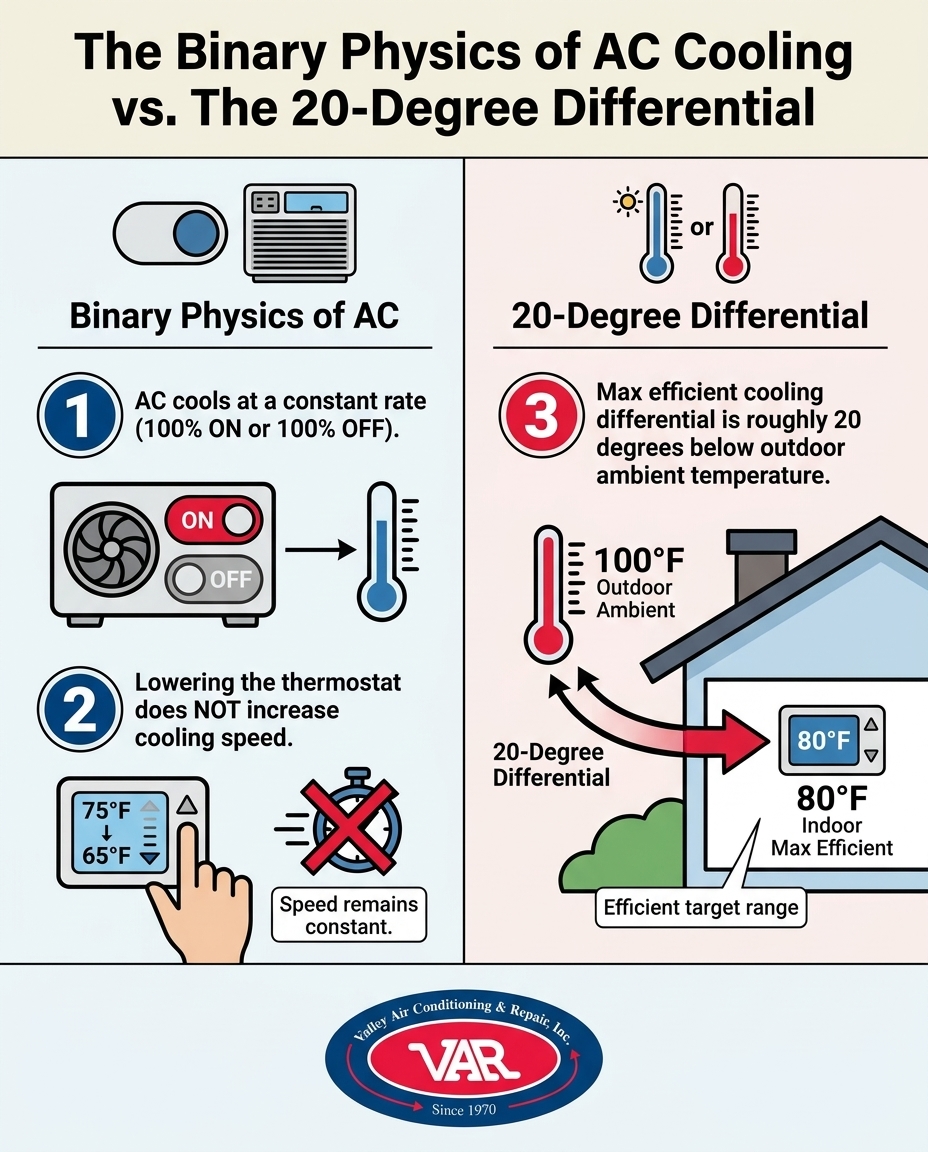
To truly understand why your cooling system takes so long to drop the temperature late in the day, we have to look at the physical limitations of residential air conditioning. The HVAC industry operates on a standard baseline: residential AC units are generally designed to maintain about a 20-degree difference from the outside air. This is known as the 20-degree differential.
In our years of servicing systems throughout the Central Valley, we constantly remind homeowners that Fresno's extreme 100-plus degree July afternoons mean the AC is fighting a massive thermal load, limiting heat transfer efficiency. If the ambient temperature outside is 105 degrees, your system is working at its maximum physical capacity just to keep the indoor temperature at 85 degrees. Expecting the system to rapidly drop the indoor temperature to 72 degrees under those conditions is asking the equipment to defy the laws of thermodynamics.
Understanding Thermal Mass in Your Home
Furthermore, your air conditioner is not just cooling the air floating in your rooms. It is battling thermal mass. Throughout the day, solar heat gain penetrates your home. That heat is absorbed by your drywall, your hardwood floors, your heavy furniture, and your carpets. When your thermostat displaying 'Recovery Mode' kicks the system on, the cold air from the vents first has to cool down the physical objects in the room before the ambient air temperature can permanently drop.
Because these objects hold onto heat and radiate it back into the room, the physical reality of thermal mass severely extends the time the system spends in its recovery phase. This is why pre-season preparation is so vital; a system that is clean, optimized, and fully charged with refrigerant will handle this intense thermal load much more effectively than a neglected unit.
When you are staring at a thermostat displaying 'Recovery Mode' for two hours, it is incredibly easy to assume the unit is broken. At Valley Air Conditioning & Repair, Inc., our team believes in being honest educators for our community. Having fielded countless frantic afternoon phone calls from Fresno homeowners, we would much rather save you an unnecessary emergency service call by explaining normal system limitations than push a repair when your system is just doing its job against extreme weather.
To help you distinguish between a system that is safely working through a heavy thermal load and a system that is actually failing, look for these specific indicators:
• Steady, strong airflow coming from all supply vents. — Red Flags (Requires Attention): Weak, barely noticeable airflow, or warm air blowing from the vents.
• Gradual temperature drop of roughly 1 to 2 degrees per hour. — Red Flags (Requires Attention): The indoor temperature continues to rise despite the AC running continuously.
• A consistent, smooth humming sound from the outdoor compressor. — Red Flags (Requires Attention): Grinding, squealing, or harsh metallic noises coming from the equipment.
• The thermostat eventually reaches the target temperature after sunset. — Red Flags (Requires Attention): Ice forming on the indoor evaporator coil or the outdoor refrigerant lines.
If your system aligns with the left column, provide reassurance to yourself that a long recovery period during a heatwave is typically a matter of physics, not a breakdown. However, if you notice the red flags in the right column, you might be dealing with an AC not responding to temperature changes due to a failing capacitor, low refrigerant, or a clogged filter. Proper preparation and understanding normal operation parameters will save you immense stress during the summer months.
You cannot control the weather, but you can control how your home prepares for it. If you are tired of dealing with a long recovery phase during a peak July afternoon in Fresno (100°F+), you need to adjust how you program your daily schedule. Based on what our technicians see working best in local homes, here are concrete solutions for setting your thermostat to handle extreme summer days:
1. Limit your "Away" temperature setting: The biggest mistake homeowners make is turning the AC completely off or setting it to 85 degrees while they are at work. Do not let the house get too hot during the day. Avoid setting the away temperature higher than 78 to 80 degrees. If the house gets too hot, the thermal mass of your furniture and walls will take hours to cool down.
2. Start the recovery period earlier: Adjust your smart thermostat schedule to begin cooling the house before the peak solar heat gain hits. If you usually get home at 5 PM, program the recovery phase to start at 2:30 PM or 3 PM. Getting a head start before the outdoor temperature hits its absolute peak gives your system a fighting chance.
3. Block solar heat gain actively: Your AC needs help. Keep your blinds, shades, and curtains tightly closed during the day, especially on south and west-facing windows. Blocking the radiant heat from the sun significantly reduces the overall thermal load your system has to overcome.
4. Utilize a gradual step-down approach: Instead of asking the thermostat to drop from 80 degrees to 72 degrees all at once, program it to step down gradually. Have it drop to 78 degrees at noon, 75 degrees at 2 PM, and 72 degrees at 4 PM. This gradual approach keeps the system from falling behind and prevents the compressor from running in a single, exhausting three-hour sprint.
5. Run your ceiling fans: Ceiling fans do not lower the room's temperature, but they do create a wind-chill effect that makes you feel cooler. Running them helps distribute the conditioned air more evenly throughout the living space, allowing you to feel comfortable even if the thermostat is still working through its recovery cycle.
It is actively trying to reach the scheduled temperature but is slowed down by extreme outdoor heat. The thermostat is not actually "stuck" or broken; it is simply calculating that it needs more time to overcome the thermal load inside your home. Once the target temperature is reached, the message will disappear automatically.
No. Air conditioners operate at a single speed and cool at a constant rate regardless of the temperature setting. Setting the dial to 65 degrees will not make the air coming out of the vents any colder than if you set it to 72 degrees. It only risks overworking the compressor if left at an unachievable setting.
During triple-digit weather, it can take several hours to drop the temperature by 5 to 8 degrees due to thermal mass. The physical walls and furniture in your home hold onto heat and release it back into the room. A general rule of thumb is to expect a temperature drop of about 1 to 2 degrees per hour during the hottest part of the afternoon.
No, it is an intended feature designed to save energy, though extreme temperature swings can make the unit run continuously. The feature itself is harmless and smart. However, asking the system to recover from an excessively high "away" temperature during peak heat forces the compressor to work without a break, which adds wear and tear over time.
Yes, most smart thermostats allow you to disable the 'smart recovery' or 'early start' feature in the settings menu. If you turn this feature off, the system will wait until the exact time you scheduled (e.g., 5 PM) to turn on, meaning you will walk into a hot house and have to wait for it to cool down manually.
Understanding your thermostat's behavior prevents unnecessary panic when you walk into a warm house. Recognizing that a thermostat displaying 'Recovery Mode' is simply doing its job against the intense afternoon heat allows you to make smarter choices about your daily programming. By keeping your "away" temperatures reasonable and blocking out the sun, you give your equipment the upper hand.
However, even the smartest thermostat cannot overcome a neglected air conditioner. A well-maintained system handles recovery periods much more efficiently, pushing stronger airflow and transferring heat effectively. Decoding your thermostat's recovery mode during peak July afternoons ultimately comes down to pairing smart scheduling with healthy equipment. Keep your home consistently comfortable by prioritizing routine AC maintenance before the next major heatwave strikes.

As a business with many AC units, it is essential to have a responsive AC company. Valley Air Conditioning understands our needs. They are always responsive and our AC is up and running very quickly.
I had them do an AC check on the home I was buying, they were honest and quick. I hired them to do the summer and Fall maintenance for $149. Happy with this company!
100% recommend. I called, same day they came out and gave me estimate. Conley was honest and didn't try to recommend/sell us anything we didn't need. When I called him with questions before making a decision, he happily answered and was not annoyed by me contacting him. Conley and VAR
This is a group of good people. Very professional and knowledgeable. They take the time to listen and find the best solution that fits best for any situation. There's no way you can go wrong in choosing VAR.
We have used Valley Air for over fifteen years. The last two years ,Matt came to our house to service twice a year. Always on time, so polite and so professional. This is a very honest company and you can always depend on them and trust them. The office always treats everyone cheerfully and always want to do what you need done very fast YOU CAN COUNT ON THIS Company


