


.webp)


Is Switching Between AC and Heat Daily Safe for Your Heat Pump?
Is switching between ac and heat daily safe? See what we typically find inside stressed heat pumps and why adjusting your thermostat deadband prevents wear.
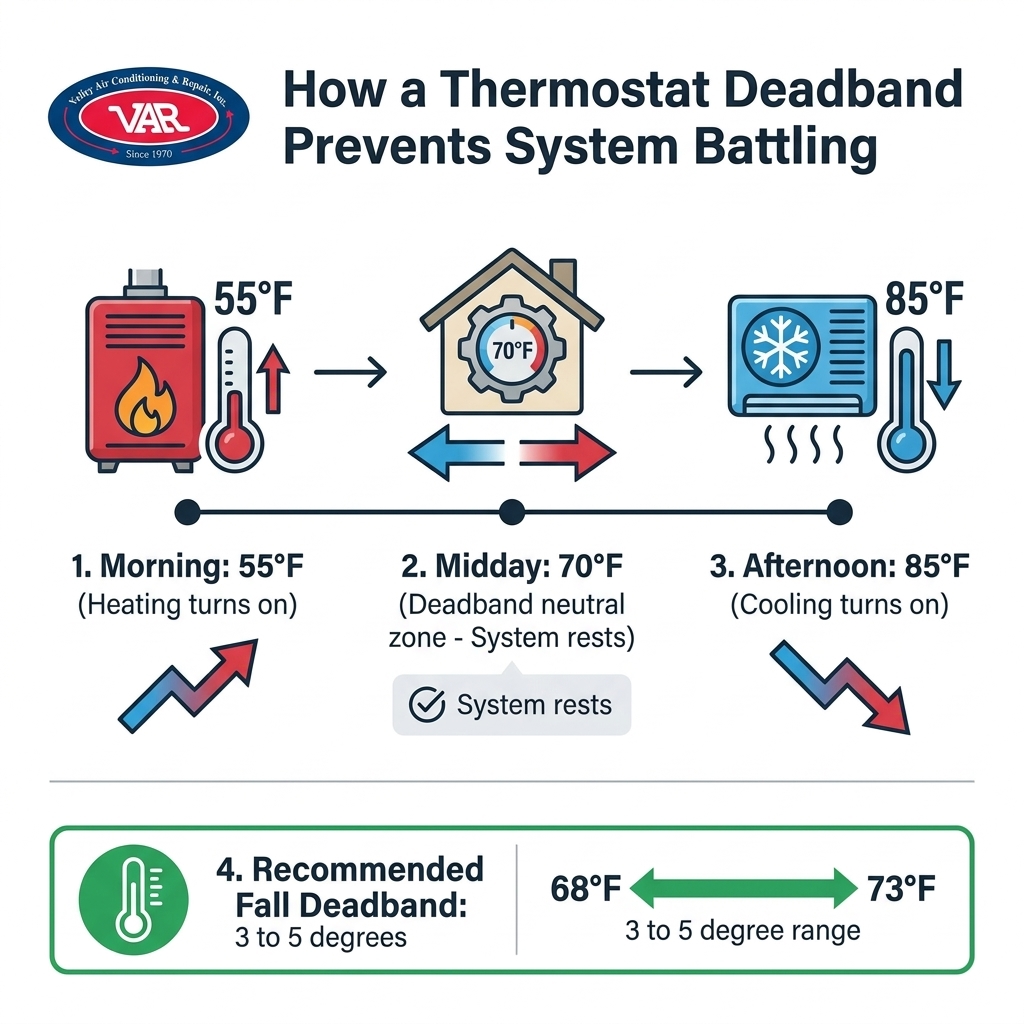
September in the Central Valley is just around the corner, which means transitioning your smart thermostat settings for unpredictable Fresno falls is about to become a daily necessity. Here at Valley Air Conditioning & Repair, Inc., we constantly hear from customers who wake up at 6:00 AM to a freezing house, only to return home from work to a living room that feels like an oven. That rapid daytime warm-up is characteristic of early fall in our region, where a 30-degree swing is a daily occurrence. When your indoor temperature chases these wild outdoor shifts—often swinging from a 55°F morning to an 85°F afternoon—your heating and cooling equipment ends up fighting each other on the exact same day. Proper smart device configuration is an essential part of getting your home ready for the changing weather.
If you need help getting your heating system ready for the shift, scheduling residential pre-season preparation is the best place to start.
The short answer is: factory-default thermostat settings are designed for gradual, predictable seasonal shifts, not the aggressive daily temperature spikes we experience in the Central Valley. Most smart thermostats come out of the box programmed for climates where a cold morning means a cold afternoon. During the September transition into early fall, our local weather completely ignores those rules.
When you rely on a default "Auto" mode, your thermostat reacts to a chilly 55°F morning by blasting the furnace to reach your target temperature. However, as the sun rises and the outdoor temperature rapidly climbs toward 85°F, the heat trapped inside your home causes the thermostat to overcorrect. Suddenly, the system shuts off the heat and immediately kicks on the cooling cycle to combat the rising indoor temperature. This constant back-and-forth is not just frustrating; it is incredibly inefficient.
This rapid toggling leads to short-cycling. Short-cycling happens when your HVAC system turns on and off too rapidly before completing a full heating or cooling cycle. It wastes a massive amount of energy, drives up your utility bills, and puts unnecessary stress on your equipment's internal components. After years of servicing systems across Fresno, our team at Valley Air Conditioning & Repair has seen exactly why out-of-the-box thermostat schedules rarely work here. You need customized user-interface settings that account for our specific weather patterns.
• Auto Mode — Factory Default Behavior: Switches immediately when temperature deviates by 1 degree. — Fresno Fall Reality: Causes furnace and AC to run on the exact same day.
• Schedule — Factory Default Behavior: Assumes consistent daytime cooling or heating needs. — Fresno Fall Reality: Requires a wide buffer to handle 30-degree daily swings.
• Fan Setting — Factory Default Behavior: Runs continuously to filter air. — Fresno Fall Reality: Circulates unconditioned air, making the house feel drafty.
By understanding how your home retains heat and how your system responds to the thermostat's commands, you can stop the cycle of energy waste. It all starts with taking control of the automated features built into your device.
Auto-switchover is a powerful feature found on modern smart thermostats with auto-switchover features, designed to keep your home comfortable without manual intervention. At its core, auto-switchover allows the thermostat to automatically toggle between your heating equipment and your cooling equipment based on the current indoor temperature. The primary benefit is convenience—you don't have to walk over to the wall and manually flip a physical switch from "Heat" to "Cool" every single afternoon when the sun hits your living room windows.
However, there is a hidden danger to this convenience. Without proper boundaries programmed into the device, auto-switchover will constantly chase the temperature. If your target is set to 72°F, the system will run the heater the moment the house drops to 71°F, and run the AC the moment it hits 73°F. This creates a relentless cycle of energy consumption. Mastering your home's climate with smart systems requires telling the auto-switchover feature exactly when to pause and let the house naturally adjust.
Signs your auto-switchover is misconfigured:
• Rapid mode swapping: You hear the furnace run at 7:00 AM and the AC compressor kick on by 11:00 AM.
• Unexpected utility spikes: Your energy bill jumps significantly during the mild transition months of early fall.
• Constant airflow: The system seems to be running non-stop, even when the house feels comfortable.
• Stuffy indoor air: The system short-cycles so quickly that it never runs long enough to properly dehumidify or filter the air.
To prevent your system from working overtime, you have to establish a neutral zone where neither the heater nor the air conditioner is allowed to run. This is where understanding and adjusting your device's internal parameters becomes critical for seasonal efficiency.
Here's the thing: the secret to conquering the 55°F morning to 85°F afternoon swings lies in a setting called the deadband. A thermostat deadband is the temperature buffer zone between your heating setpoint and your cooling setpoint. Inside this specific temperature range, the thermostat is completely satisfied, meaning it sends no signals to either the furnace or the air conditioner. The system simply rests.
Most smart thermostats default to a very narrow deadband, typically around 1 to 2 degrees. While a tight deadband might make sense in the middle of a freezing winter or a boiling summer, it is a recipe for disaster during the fall transition. A 2-degree buffer causes the system to battle itself as the sun comes up and naturally warms your home. The heater works hard to warm the house, and minutes later, the AC kicks on to erase that exact same heat.
The quick fix: Our technicians at Valley Air Conditioning & Repair highly recommend expanding the deadband to 3 to 5 degrees during the fall transition. By widening this neutral zone, you allow your home to absorb natural solar heat during the late morning without triggering the cooling system prematurely.
For example, if you set your heating setpoint to 68°F and your cooling setpoint to 74°F, you have created a generous 6-degree deadband. When you wake up to a chilly 55°F morning, the heater will warm the house to 68°F and then shut off. As the outdoor temperature climbs toward 85°F throughout the day, your home will naturally warm up from 68°F to 73°F. During this entire period, your HVAC system remains completely off, saving you energy. The AC will only intervene if the indoor temperature crosses the 74°F threshold.
Adjusting your deadband and auto-switchover settings does not require any tools, wiring, or opening up the wall unit. These are entirely safe, user-level adjustments that you can make directly through your device's touchscreen or mobile application. Smart thermostats with auto-switchover features are designed to be customized, and taking a few minutes to dial in your preferences can drastically improve your comfort. In fact, our team at Valley Air Conditioning & Repair recently provided knowledgeable service for heating maintenance and thermostat replacement across multiple buildings for a large commercial campus in the Fresno area; by making precise user-level adjustments to their new smart controls, they kept their extensive commercial HVAC systems functional and highly efficient during the transitional weather. The exact same principles apply to your residential home.
1. Access the main menu: Wake up your thermostat by tapping the screen or opening the manufacturer's mobile app. Navigate to the "Settings" or "Preferences" icon, usually represented by a gear symbol.
2. Locate the mode settings: Look for the menu labeled "System Mode," "HVAC Mode," or "Auto-Changeover." Ensure the system is set to "Auto" rather than strictly "Heat" or "Cool."
3. Adjust the setpoints: You will now see two temperature sliders or numbers—one for heating and one for cooling. Adjust the heat setpoint down (e.g., 68°F) and the cool setpoint up (e.g., 74°F) to ensure a minimum 3 to 5-degree gap between them.
4. Save and monitor: Save your new schedule. This wider gap accommodates natural daytime warming without triggering the air conditioning prematurely.
Modern smart units offer the incredible convenience of phone control. Use the manufacturer's app to monitor your indoor temperatures during peak afternoon heat while you are away at work. If you notice the system running unnecessarily—perhaps the AC is kicking on at 1:00 PM when nobody is home—you can seamlessly adjust the deadband remotely. Pushing the cooling setpoint up just one or two more degrees from your phone can prevent hours of wasted energy without sacrificing your comfort by the time you return home.
Proper deadband settings do much more than just lower your monthly utility bill; they actively protect the physical health of your HVAC system. Every time your system turns on, it draws a massive surge of electricity and puts mechanical stress on moving parts. The blower motor has to spin up, the contactors engage, and the compressor pressurizes the refrigerant. When your system short-cycles because of a narrow deadband, these components are subjected to this stressful startup sequence dozens of times a day.
By letting the house naturally warm up in the late morning and early afternoon, you are significantly reducing unnecessary wear and tear. A wider deadband allows the compressor oil to circulate properly when the system finally does run, and it prevents the blower motor from burning out prematurely. This energy-efficient approach extends the lifespan of your equipment and reduces the likelihood of unexpected breakdowns during the September transition into early fall.
System health indicators to watch for during the fall transition:
• Smooth cycles: The system should run for at least 10 to 15 minutes at a time, rather than shutting off after 3 minutes.
• Accurate readings: The temperature displayed on your smart thermostat should match how the room actually feels.
• Quiet transitions: You shouldn't hear the system aggressively clicking back and forth between heating and cooling modes.
Of course, smart settings only work if the physical equipment is in good condition. If your thermostat's sensors are covered in dust or your furnace has a clogged filter, even the best schedule won't keep you comfortable. An active HVAC maintenance plan ensures that your smart thermostat and your physical heating and cooling equipment communicate flawlessly. A professional inspection verifies that sensors are reading temperatures accurately and that the system is fully prepared to handle the upcoming winter workload.
A thermostat deadband is the designated temperature buffer zone between your heating setpoint and your cooling setpoint. Inside this neutral zone, the thermostat is satisfied and will not turn on either the furnace or the air conditioner. Expanding this buffer is the most effective way to prevent your heating and cooling systems from fighting each other during days with rapid temperature swings.
Yes, leaving your thermostat on auto is highly recommended in the fall, provided you have configured a wide enough deadband. Auto mode allows the system to seamlessly handle chilly mornings and warm afternoons without manual intervention. However, if your deadband is too narrow, auto mode will cause your system to waste energy by short-cycling between heat and AC.
Your AC and heater are running on the same day because your thermostat's auto-switchover settings have a very narrow temperature gap. When the morning is cold, the heater warms the house to your target temperature; when the afternoon sun rapidly heats the home past that target, the AC immediately turns on to cool it back down. Widening the gap between your heating and cooling setpoints solves this issue.
Auto-switchover works by constantly monitoring the indoor temperature and automatically activating either the heating or cooling equipment to maintain your desired comfort range. Smart thermostats with auto-switchover features eliminate the need to manually flip a switch from "Heat" to "Cool." The system relies on your programmed setpoints to determine which mode is necessary at any given time of day.
The most energy-efficient deadband setting for autumn is a gap of at least 3 to 5 degrees between your heating and cooling targets. For example, setting your heat to kick on at 68°F and your AC to kick on at 74°F creates a generous 6-degree neutral zone. This allows your home to naturally warm up during the day without forcing the HVAC system to consume unnecessary power.
Navigating the September transition into early fall requires more than just smart programming. While expanding your deadband and optimizing your auto-switchover settings will save energy and improve comfort, those smart settings only work if the underlying equipment is well-maintained and ready to perform. Before the deep winter cold sets in and your furnace is forced to run around the clock, now is the time to ensure everything is mechanically sound. Schedule your seasonal tune-up today to guarantee clear, safe, and efficient operation all season long.

As a business with many AC units, it is essential to have a responsive AC company. Valley Air Conditioning understands our needs. They are always responsive and our AC is up and running very quickly.
I had them do an AC check on the home I was buying, they were honest and quick. I hired them to do the summer and Fall maintenance for $149. Happy with this company!
100% recommend. I called, same day they came out and gave me estimate. Conley was honest and didn't try to recommend/sell us anything we didn't need. When I called him with questions before making a decision, he happily answered and was not annoyed by me contacting him. Conley and VAR
This is a group of good people. Very professional and knowledgeable. They take the time to listen and find the best solution that fits best for any situation. There's no way you can go wrong in choosing VAR.
We have used Valley Air for over fifteen years. The last two years ,Matt came to our house to service twice a year. Always on time, so polite and so professional. This is a very honest company and you can always depend on them and trust them. The office always treats everyone cheerfully and always want to do what you need done very fast YOU CAN COUNT ON THIS Company


